
This post is part of a series on an ongoing project. In yesterday’s post, I added support for uploading files to the backend. Today I’m going to focus on implementing the frontend side.
InputFile State
For starters, I need to add state to the InputFile component. The component can exist in the initial state – without a file, it can be uploading a file, it can have completed uploading the file, or it could have encountered an error. The overall app needs to know if the InputFile component has completed the upload because all three files must be uploaded for the workflow to progress – so I can’t push this state down completely inside the InputFile component.
const HAS_NO_FILE = "hasNoFile";
const FILE_UPLOADED = "fileUploaded";
const FILE_UPLOADING = "fileUploading";
const ERROR = "error";
The component will need to track its current state, the local name of the file, and the server name of the file. Thus, it needs to track three separate state variables and make sure that they cannot exist in a non-sensical combination (i.e. there should only be a server file name if the file upload has completed).
To deliver this function, I define an InputFileState class that is immutable. The class doesn’t expose any functions or variables that change its state. The class’s variables are private and are only modified within class functions.
export class InputFileState {
    #localFile = null;
    #serverFileName = "";
    #state = "";

    constructor() {
        this.#localFile = null;
        this.#serverFileName = "";
        this.#state = HAS_NO_FILE;
    }

    isHasNoFile() {
        return this.#state === HAS_NO_FILE;
    }

    isError() {
        return this.#state === ERROR;
    }

    isReady() {
        return this.#state === FILE_UPLOADED;
    }

    isFileUploading() {
        return this.#state === FILE_UPLOADING;
    }
To change from one state to another, the class publishes setXX() functions that actually copy the existing object and return a brand new one. This means that the object cannot get stuck in a race condition where some code sees the old state while other code sees the new state.
    setFileUploading(localFile) {
        const nextState = new InputFileState();
        nextState.#localFile = localFile;
        nextState.#serverFileName = "";
        nextState.#state = FILE_UPLOADING;
        return nextState;
    }

    setFileUploaded(serverFile) {
        const nextState = new InputFileState();
        nextState.#localFile = this.#localFile;
        nextState.#serverFileName = serverFile;
        nextState.#state = FILE_UPLOADED;
        return nextState;
    }

    setError() {
        const nextState = new InputFileState();
        nextState.#localFile = this.#localFile;
        nextState.#serverFileName = "";
        nextState.#state = ERROR;
        return nextState;
    }
App Becomes a Class
I also need to change my App() function into a class, because it will now need to track state. So I’ll change it and give it a constructor to initialize state accordingly.
class App extends React.Component {

    constructor(props) {
        super(props);

        this.state = {
            projectSheet: new InputFileState(),
            employeeCost: new InputFileState(),
            timeReport: new InputFileState(),
        }
    }
The old contents of the App() function move to its render() function.
    render() {
        const projectSheetState = InputFileState.copy(this.state.projectSheet);
        const employeeCostState = InputFileState.copy(this.state.employeeCost);
        const timeReportState = InputFileState.copy(this.state.timeReport);

        return (
            <div className="App">
                <Column>
                    <Row>
                        <Card width="15em" title="Project Sheet">
                            <InputFile
                                state={projectSheetState}
                                onFileAdded={this.onProjectSheetFileAdded}
                                onClear={this.onProjectSheetCleared}
                            />
When the user adds a file to the component, we change state and kick off the upload via the projectSheetFileAdded() function. Note, the call to InputFile.setFileUploading() which is our copy with modification constructor.
    onProjectSheetFileAdded = (file) => {
        const currentState = InputFileState.copy(this.state.projectSheet);
        this.setState({
            projectSheet: currentState.setFileUploading(file),
        });

        this.uploadFile(file, this.onProjectSheetUploadSuccess, this.onProjectSheetLogUploadError);
    };
The actual upload is performed in the uploadFile() function, listed below. It takes two callback functions, one on success, and one on error.
    uploadFile(file, onSuccess, onError) {
        const formData = new FormData();
        formData.append("file", file, file.name);

        fetch("/jobcost/upload", {
            method: "POST",
            body: formData,
        })
            .then((response) => {
                if(!response.ok) {
                    console.error(response);
                    throw new Error("Response from server not OK");
                }
                return response.json();
            })
            .then((result) => {
                if(result.success == null)
                    throw new Error(result);

                console.log("Success: ", result);
                onSuccess(result.success.fileName);
            })
            .catch((error) => {
                console.log(error);
                onError();
            });
    }
The two callback functions simply update state, and in the case of an error, alert the user.
    onProjectSheetUploadSuccess = (fileName) => {
        const currentState = InputFileState.copy(this.state.projectSheet);
        this.setState( {
            projectSheet: currentState.setFileUploaded(fileName),
        });
        console.log(this.state.projectSheet);
    };

    onProjectSheetLogUploadError = () => {
        const currentState = InputFileState.copy(this.state.projectSheet);
        this.setState({
            projectSheet: currentState.setError(),
        });
        alert('Unable to upload file, please see console for more information.');
    };
Look and Feel
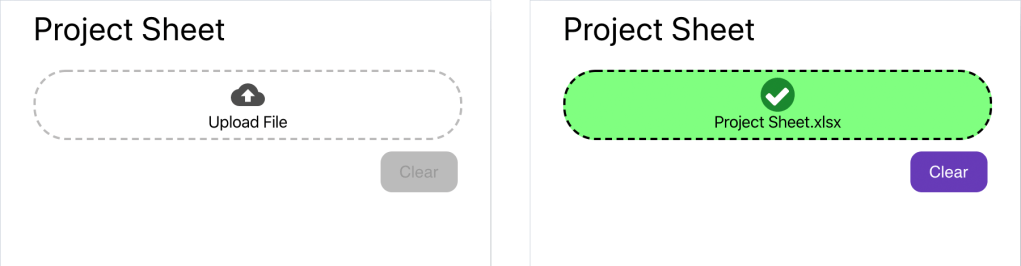
Finally, I add some CSS work to make the DropZone component reflect the state passed in from InputFile. And now it’s looking pretty good!
Next
Next will be to add this function for the other two file upload components, including the EncryptedFileInput component. I already have the state nicely contained in a class, but the functions controlling the state and behavior are jammed in the App class. That needs to change, and that will be the focus of the next post!
 Ryan Sawatzky