
Last time, I added a React frontend to my Maven/Spring/Kotlin project, and today I’ll focus on packaging it all together. The goal is to deploy the app as a single JAR file. Let’s dive right in!
Add Maven Support
First, I’ll add the necessary npm commands to my Maven pom.xml file. The file needs to install target versions of npm and node.js. It also needs to produce a production build of the React app.
Let’s start by identifying the version numbers of the third party tools that I’ll be using. I will need the frontend Maven plugin. At the time of writing, the latest version is 1.9.0. For npm and node.js I’ll simply reference the versions that I currently have installed (6.13.4 and v12.14.1, respectively).
~/IdeaProjects/job-costing> npm -version
6.13.4
~/IdeaProjects/job-costing> node -v
v12.14.1
~/IdeaProjects/job-costing>
Let’s start with declaring the versions of the third party tools. I’ll add lines 22, 23, and 24 to specify the tool versions
<properties>
   <java.version>1.8</java.version>
   <kotlin.version>1.3.61</kotlin.version>
   <frontend-maven-plugin.version>1.9.0</frontend-maven-plugin.version>
   <npm.version>6.13.4</npm.version>
   <node.version>v12.14.1</node.version>
</properties>
Next, I need to add a build plugin to make this all happen. Under the build/plugins section of my pom.xml file, I add the following chunk of XML.
<plugin>
   <groupId>com.github.eirslett</groupId>
   <artifactId>frontend-maven-plugin</artifactId>
   <version>${frontend-maven-plugin.version}</version>

   <configuration>
      <workingDirectory>frontend</workingDirectory>
      <installDirectory>target</installDirectory>
   </configuration>

   <executions>
      <execution>
         <id>install node/npm</id>
         <goals> <goal>install-node-and-npm</goal> </goals>
         <configuration>
            <nodeVersion>${node.version}</nodeVersion>
            <npmVersion>${npm.version}</npmVersion>
         </configuration>
      </execution>

      <execution>
         <id>npm install</id>
         <goals> <goal>npm</goal> </goals>
         <configuration> <argumnet>install</argumnet> </configuration>
      </execution>

      <execution>
         <id>npm run build</id>
         <goals> <goal>npm</goal> </goals>
         <configuration> <argument>run build</argument> </configuration>
      </execution>
   </executions>
</plugin>
Now I can clean out my project and run a Maven install. This will download and install the targeted versions of npm and node.js.
~/IdeaProjects/job-costing> ./mvnw clean
[INFO] Scanning for projects...
[INFO]
[INFO] ----------------------------< job-costing >-----------------------------
[INFO] Building job-costing 0.0.1-SNAPSHOT
[INFO] --------------------------------[ jar ]---------------------------------
[INFO]
[INFO] --- maven-clean-plugin:3.1.0:clean (default-clean) @ job-costing ---
[INFO] Deleting ~/IdeaProjects/job-costing/target
[INFO] ------------------------------------------------------------------------
[INFO] BUILD SUCCESS
[INFO] ------------------------------------------------------------------------
[INFO] Total time:  0.342 s
[INFO] Finished at: 2020-03-02T14:22:19-06:00
[INFO] ------------------------------------------------------------------------

~/IdeaProjects/job-costing> ./mvnw install
[INFO] Scanning for projects...
[INFO]
[INFO] ----------------------------< job-costing >-----------------------------
[INFO] Building job-costing 0.0.1-SNAPSHOT
[INFO] --------------------------------[ jar ]---------------------------------
[INFO]
[INFO] --- kotlin-maven-plugin:1.3.61:compile (compile) @ job-costing ---
[INFO]
[INFO] --- frontend-maven-plugin:1.9.0:install-node-and-npm (install node/npm) @ job-costing ---
[INFO] Installing node version v12.14.1
[INFO] Unpacking ~/.m2/repository/com/github/eirslett/node/12.14.1/node-12.14.1-darwin-x64.tar.gz into ~/IdeaProjects/job-costing/target/node/tmp
[INFO] Copying node binary from ~/IdeaProjects/job-costing/target/node/tmp/node-v12.14.1-darwin-x64/bin/node to ~/IdeaProjects/job-costing/target/node/node
[INFO] Installed node locally.
[INFO] Installing npm version 6.13.4
[INFO] Unpacking ~/.m2/repository/com/github/eirslett/npm/6.13.4/npm-6.13.4.tar.gz into ~/IdeaProjects/job-costing/target/node/node_modules
[INFO] Installed npm locally.

/* A whole bunch of stuff */

[INFO] --- frontend-maven-plugin:1.9.0:npm (npm run build) @ job-costing ---
[INFO] Running 'npm run build' in /Users/ryan/IdeaProjects/job-costing/frontend
[INFO]
[INFO] > frontend@0.1.0 build /Users/ryan/IdeaProjects/job-costing/frontend
[INFO] > react-scripts build
[INFO]
[INFO] Creating an optimized production build...
[INFO] Compiled successfully.
You can see the specific versions of node.js and npm that get installed on lines 27 and 31. And then the production build is kicked off on line 38. After that completes, I have a production build located under /frontend/build.
Adding Frontend to the JAR
The next step is going to be adding the production optimized React build into the distributable JAR file. What we’re going to do is copy all the production files from /frontend/build to /target/classes/public so that Maven picks them up and puts them into the JAR. And I’m going to use a Maven plugin to do this. First, I’ll specify the version number in the properties section of the pom.xml.
	<properties>
		<java.version>1.8</java.version>
		<kotlin.version>1.3.61</kotlin.version>
		<frontend-maven-plugin.version>1.9.0</frontend-maven-plugin.version>
		<npm.version>6.13.4</npm.version>
		<node.version>v12.14.1</node.version>
		<maven-antrun-plugin.version>1.8</maven-antrun-plugin.version>
	</properties>
I also need to add the plugin under /build/plugins.
<plugin>
   <groupId>org.apache.maven.plugins</groupId>
   <artifactId>maven-antrun-plugin</artifactId>
   <version>${maven-antrun-plugin.version}</version>

   <executions>
      <execution>
         <phase>generate-resources</phase>
         <configuration>
            <target>
               <copy todir="${project.build.directory}/classes/public">
                  <fileset dir="${project.basedir}/frontend/build"/>
               </copy>
            </target>
         </configuration>
         <goals> <goal>run</goal> </goals>
      </execution>
   </executions>
</plugin>
The plugin will copy the optimized production React build into the /target/classes/public directory, and then Maven should package them up into the JAR file. After I run a Maven install, let’s take a look at the JAR to see if it worked.
~/IdeaProjects/job-costing/target> jar tvf ./job-costing-0.0.1-SNAPSHOT.jar | grep public
     0 Mon Mar 02 16:42:42 CST 2020 BOOT-INF/classes/public/
     0 Mon Mar 02 16:42:42 CST 2020 BOOT-INF/classes/public/static/
     0 Mon Mar 02 16:42:42 CST 2020 BOOT-INF/classes/public/static/css/
     0 Mon Mar 02 16:42:42 CST 2020 BOOT-INF/classes/public/static/js/
     0 Mon Mar 02 16:42:42 CST 2020 BOOT-INF/classes/public/static/media/
   492 Mon Mar 02 16:42:42 CST 2020 BOOT-INF/classes/public/manifest.json
   763 Mon Mar 02 16:42:42 CST 2020 BOOT-INF/classes/public/precache-manifest.de56fd271ef4ae5cb7dab75aa32cc199.js
  1181 Mon Mar 02 16:42:42 CST 2020 BOOT-INF/classes/public/service-worker.js
  3150 Mon Mar 02 16:42:42 CST 2020 BOOT-INF/classes/public/favicon.ico
  2217 Mon Mar 02 16:42:42 CST 2020 BOOT-INF/classes/public/index.html
  5347 Mon Mar 02 16:42:42 CST 2020 BOOT-INF/classes/public/logo192.png
  9664 Mon Mar 02 16:42:42 CST 2020 BOOT-INF/classes/public/logo512.png
  1099 Mon Mar 02 16:42:42 CST 2020 BOOT-INF/classes/public/asset-manifest.json
  1069 Mon Mar 02 16:42:42 CST 2020 BOOT-INF/classes/public/static/css/main.d1b05096.chunk.css
  1514 Mon Mar 02 16:42:42 CST 2020 BOOT-INF/classes/public/static/css/main.d1b05096.chunk.css.map
130629 Mon Mar 02 16:42:42 CST 2020 BOOT-INF/classes/public/static/js/2.6824de1d.chunk.js
   790 Mon Mar 02 16:42:42 CST 2020 BOOT-INF/classes/public/static/js/2.6824de1d.chunk.js.LICENSE.txt
  1658 Mon Mar 02 16:42:42 CST 2020 BOOT-INF/classes/public/static/js/main.4feeb7ab.chunk.js
  8276 Mon Mar 02 16:42:42 CST 2020 BOOT-INF/classes/public/static/js/runtime-main.3a02ae19.js.map
  1557 Mon Mar 02 16:42:42 CST 2020 BOOT-INF/classes/public/static/js/runtime-main.3a02ae19.js
  8043 Mon Mar 02 16:42:42 CST 2020 BOOT-INF/classes/public/static/js/main.4feeb7ab.chunk.js.map
316162 Mon Mar 02 16:42:42 CST 2020 BOOT-INF/classes/public/static/js/2.6824de1d.chunk.js.map
  2671 Mon Mar 02 16:42:42 CST 2020 BOOT-INF/classes/public/static/media/logo.5d5d9eef.svg
    67 Mon Mar 02 16:42:42 CST 2020 BOOT-INF/classes/public/robots.txt
~/IdeaProjects/job-costing/target>
And sure enough, they are!
Running the App
Time to run the app and make sure it works. Now that the whole app is packaged in a single JAR file, I should be able to simply run the JAR and test it out.
~/IdeaProjects/job-costing/target> java -jar job-costing-0.0.1-SNAPSHOT.jar
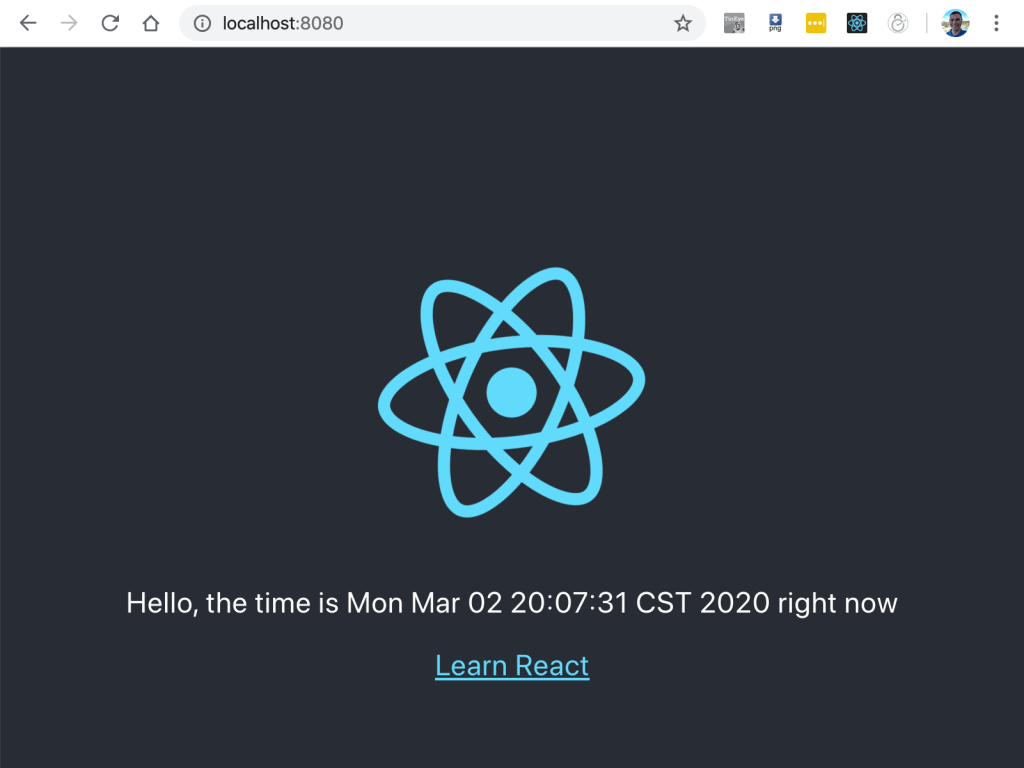
Everything boots up, and I see a whole lot of standard Spring output to the console. I open up http://loalhost:8080 in my browser to see how it looks.
Whoops!
And I find an error! The page is unable to call the REST service. Looking into it, I see that the frontend is calling the service at http://localhost:3000/jobcost/hello. That was fine for development, but in the deployed version that isn’t working anymore. I simply need to change the URL to a relative path (on line 12). Here’s the new componentDidMount() function.
  componentDidMount = () => {
    console.log("componentDidMount()");
    fetch('/jobcost/hello')
        .then((res) => res.text())
        .then((text) => {
            this.setState({message: text} );
        })
        .catch(console.log);
  };
After that quick fix. Everything looks good!
Wrap Up
Now we have a Maven project that builds a Kotlin/Spring backend RESTful service and a React frontend that calls into a single deployable JAR file. That single JAR file can be deployed to the client’s AWS instance in a simple process. Now that I have the basic structure of the app working, it’s time to dig into the actual business logic.
 Ryan Sawatzky