
Today’s post will focus on standing up a very simple example of combining Kotlin with the Spring Boot framework. This is a small step of my larger Job Costing project, where I have ported a Java Swing app to a React/Kotlin/Spring app. This will be a very simple exercise and should only take a few minutes to setup. Then it’ll serve as a basic starting point for the rest of the project.
Spring Boot
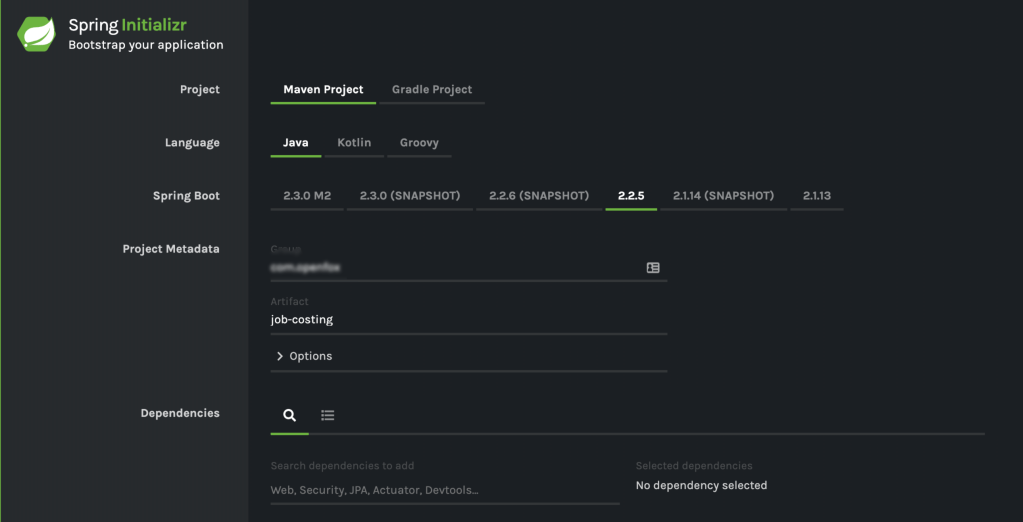
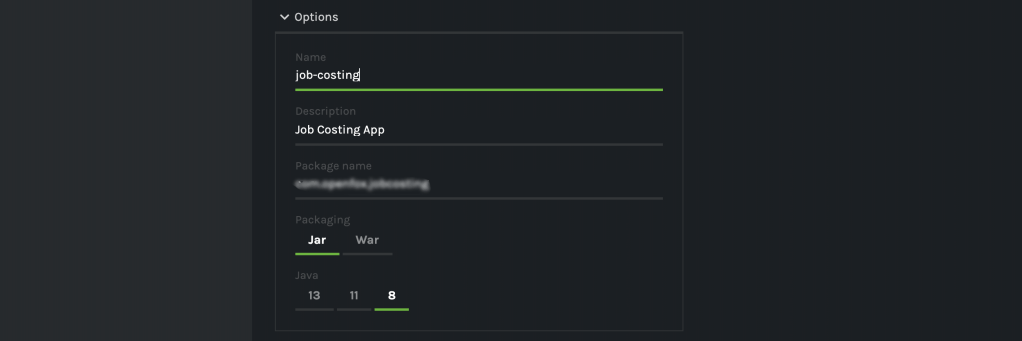
First, I hop over to the Spring Initializer at https://start.spring.io/ to get a basic Maven framework for my project. Although the Spring Initializer now supports projects built on Kotlin, I’m going to select Java as most of the source that I’m using is going to be Java source from the old Swing app. I’ll target Spring version 2.2.5, Java version 8, and deploy into a JAR file. Spring Initializer generates a ZIP file that I’ll download and merge into my IntelliJ project in just a bit.
Create the IntelliJ Project
Next, I create the project in IntelliJ as a new Maven project. This will setup the IDE with its default settings for Maven and save me some manual steps.


Merge & Initialize GIT
After IntelliJ does its thing and creates the project, I merge in the files from the ZIP file I downloaded from the Spring Initializer. Now is also a good time to initialize a GIT repo and perform my initial project commit. The files from SpringInitializer come with a pre-built .gitignore file which is already setup for IntelliJ’s structure.
~/IdeaProjects/job-costing> git commit
[master (root-commit) 6caa105] Initial Project Commit
 10 files changed, 720 insertions(+)
 create mode 100644 .gitignore
 create mode 100644 .mvn/wrapper/MavenWrapperDownloader.java
 create mode 100644 .mvn/wrapper/maven-wrapper.jar
 create mode 100644 .mvn/wrapper/maven-wrapper.properties
 create mode 100755 mvnw
 create mode 100644 mvnw.cmd
 create mode 100644 pom.xml
 create mode 100644 src/main/java/com/openfox/jobcosting/JobCostingApplication.java
 create mode 100644 src/main/resources/application.properties
 create mode 100644 src/test/java/com/openfox/jobcosting/JobCostingApplicationTests.java
~/IdeaProjects/job-costing>
Add Kotlin Support
Next, I add support for Kotlin into the project and make sure that I can call Java code from my Kotlin. Let’s jump into the pom.xml file and make the changes. First, I declare a kotlin.version property to target version 1.3.61
<properties>
   <java.version>1.8</java.version>
   <kotlin.version>1.3.61</kotlin.version>
</properties>
Next, I need a couple project dependencies as well.
<dependency>
   <groupId>org.jetbrains.kotlin</groupId>
   <artifactId>kotlin-stdlib</artifactId>
   <version>${kotlin.version}</version>
</dependency>
<dependency>
   <groupId>org.jetbrains.kotlin</groupId>
   <artifactId>kotlin-reflect</artifactId>
   <version>${kotlin.version}</version>
</dependency>
And then a new build plugin to compile the Kotlin code and let it reference existing Java code
<plugin>
   <groupId>org.jetbrains.kotlin</groupId>
   <artifactId>kotlin-maven-plugin</artifactId>
   <version>${kotlin.version}</version>

   <executions>
      <execution>
         <id>compile</id>
         <phase>process-sources</phase>
         <goals> <goal>compile</goal> </goals>
      </execution>

      <execution>
         <id>test-compile</id>
         <phase>process-test-sources</phase>
         <goals> <goal>test-compile</goal> </goals>
      </execution>
   </executions>
</plugin>

The main.kt
Now I’ll remove the default Java project source file and replace it with a Kotlin version. I name the file “main.kt” and simply start up the Spring application.
fun main(args: Array<String>) {
    SpringApplication.run(Application::class.java, *args)
}

@SpringBootApplication
open class Application {}
The Hello Controller
My REST controllers are going to be implemented in Kotlin and they are going to call logic that already exists in Java files (from the Swing app). I want to make a basic test of that structure now. I’ll create two packages under the main project package and call them “controller” and “rules”. The controller package contains my Kotlin REST controllers, and the rules package will contain the Java source files moved from the Swing app.
First, I create the Java file – it simply has a public static function that returns the current date and time as a string.
public class HelloRule {
    public static String getCurrentTime() {
        return new Date().toString();
    }
}
Next, I create the Kotlin REST controller. All it does is answer GET requests with a string, and it calls the HelloRule Java class to get the current date/time.
@RestController
class Hello {

    @GetMapping("/jobcost/hello")
    fun handleHello(): String {
        return "Hello, the time is ${HelloRule.getCurrentTime()} right now"
    }
}
Test It
Now is the time to make sure everything is working as expected. I make a new IntelliJ Run Configuration to start my up my app, with main.kt as the entry point, and then run it. I see the expected Spring logo on standard out.

Then I just need to validate that my controller is serving requests. I’ll use Curl to test out the API. I’ll set Curl in verbose mode just to see the detail, and then I send a GET to “localhost:8080/jobcost/hello” and the controller answers.
~/IdeaProjects/job-costing> curl -v http://localhost:8080/jobcost/hello
*   Trying ::1...
* TCP_NODELAY set
* Connected to localhost (::1) port 8080 (#0)
> GET /jobcost/hello HTTP/1.1
> Host: localhost:8080
> User-Agent: curl/7.64.1
> Accept: */*
>
< HTTP/1.1 200
< Content-Type: text/plain;charset=UTF-8
< Content-Length: 57
< Date: Fri, 28 Feb 2020 16:40:58 GMT
<
* Connection #0 to host localhost left intact
Hello, the time is Fri Feb 28 10:40:58 CST 2020 right now* Closing connection 0
~/IdeaProjects/job-costing>
Wrap Up
So there you have it! In just a few minutes, I’ve stood up a very simple Rest API in Kotlin using Spring Boot and Maven. This is very simple, and it works. That’s a solid foundation for the next piece, which will be adding in React for the user interface.
 Ryan Sawatzky